

The Raspberry Pi 5 is a significant leap forward in performance. It’s no longer just a hobby board for blinking LEDs; it’s a capable desktop replacement, a powerful media center, and even a local AI node. With the introduction of the PCIe port for fast NVMe storage and a CPU fast enough to handle real-time transcoding, the possibilities have expanded properly.
If you have a Pi 5 collecting dust or want to upgrade your current setup, here are the 8 must-have projects that specifically take advantage of the Pi 5’s new capabilities.
The Ultimate Pi 5 Project List
We’ve curated this list to cover Smart Homes, Media, AI, and Gaming, complete with installation links.
1. Home Assistant (Smart Home Hub)
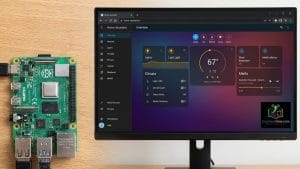
Description: The ultimate open-source automation hub. Integrates thousands of devices (lights, vacuums, locks) into one dashboard.
Pi 5 Advantage: Faster boot times, snappy dashboards, and can handle complex automations instantly without the lag seen on older Pis.
How to Install:
Easiest Method: Flash the HAOS (Home Assistant OS) image directly to your SD card or SSD using the Raspberry Pi Imager.
Download: Home Assistant Installation Guide
2. Pi-hole or AdGuard Home (Network Blocker)

Description: A “black hole” for internet advertisements and trackers. It blocks ads network-wide (Smart TVs, phones) at the DNS level.
Pi 5 Advantage: While lightweight, running this alongside other heavy apps is seamless on the Pi 5.
How to Install:
Command Line: Run
curl -sSL https://install.pi-hole.net | bashin your terminal.Download: Pi-hole Official Site
3. Jellyfin or Plex (Media Server)

Description: Organize and stream your own movies, TV shows, and music to any device in your house (your private Netflix).
Pi 5 Advantage: Transcoding. The Pi 5 CPU is powerful enough to handle software transcoding (converting video formats on the fly), a major struggle for the Pi 4.
How to Install:
Recommendation: Use Docker or CasaOS for the easiest setup.
Download: Jellyfin Downloads
4. Ollama (AI Node)
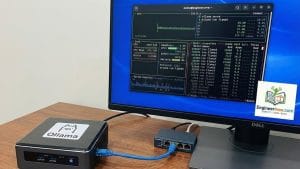
Description: Run private, local AI models (like Llama 3 or Phi-3) directly on your Pi without sending data to the cloud.
Pi 5 Advantage: The Pi 5 is the first Pi capable of running usable Local Large Language Models (LLMs) at decent token-per-second speeds.
How to Install:
Command: Run
curl -fsSL https://ollama.com/install.sh | shAdd UI: We recommend installing Open WebUI via Docker to chat with it easily.
Download: Ollama GitHub
5. n8n (Automation)

Description: A workflow automation tool (similar to Zapier or IFTTT) that links your apps together visually.
Pi 5 Advantage: Connects emails, Google Sheets, and Home Assistant in complex workflows without slowing down your system.
How to Install:
Method: Best run via Docker.
Command:
docker run -it --rm --name n8n -p 5678:5678 -v ~/.n8n:/home/node/.n8n docker.n8n.io/n8nio/n8nDownload: n8n Docker Guide
6. Nextcloud (Cloud Storage)

Description: Your own self-hosted “Google Drive” or “Dropbox.” Store photos, files, and contacts privately.
Pi 5 Advantage: With the PCIe port, you can connect NVMe SSDs for incredibly fast file transfer speeds, making USB bottlenecks a thing of the past.
How to Install:
Method: The NextcloudPi image or via CasaOS one-click install is recommended.
Download: Nextcloud Install Page
7. Immich (Photo Backup)

Description: A high-performance photo and video backup solution (Google Photos alternative) with facial recognition.
Pi 5 Advantage: The Pi 5’s power makes browsing large libraries smooth and handles the Machine Learning required for facial recognition much faster.
How to Install:
Method: Strictly requires Docker Compose.
Download: Immich Documentation & Install Script
8. RetroPie (Gaming)

Description: Turn your Pi into a retro gaming console to play thousands of classic arcade and console games.
Pi 5 Advantage: Can emulate harder systems like GameCube, Wii, and PS2 (some titles), which were largely unplayable on the Pi 4.
How to Install:
Method: Flash the RetroPie image to your SD card using Raspberry Pi Imager.
Download: RetroPie Downloads
Copyright @EngineerHow.com
Project Highlights & Architecture: How to Build It
The raw power of the Raspberry Pi 5 allows for new architectural approaches that weren’t feasible before. Here is how to structure your setup.
1. The “All-in-One” Architecture
Because the Pi 5 is so powerful, you no longer need separate Pis for different tasks. You can run Pi-hole, Home Assistant, and Jellyfin simultaneously on a single board without performance degradation.
Recommendation: Instead of a bare OS, install CasaOS or Umbrel on top of Raspberry Pi OS.

Why? It gives you a one-click visual interface (like an App Store) to install Home Assistant, Pi-hole, and Jellyfin instantly using Docker containers in the background.
Install CasaOS: Run
curl -fsSL https://get.casaos.io | sudo bash
2. The AI Capability (Local LLM)
The most distinct “new” feature of the Pi 5 is its ability to serve as an AI Node.
Project Idea: Install Ollama combined with Open WebUI.
The Result: You can chat with an AI (similar to ChatGPT) that lives entirely inside your Pi. It works offline, costs nothing per query, and keeps your data 100% private.
3. Storage is Key (The PCIe Upgrade)
For projects like Media Streaming (Jellyfin) and Cloud Storage (Nextcloud), the microSD card is your enemy. It is slow and will eventually fail under heavy write loads.
The Pi 5 Fix: Use the Pi 5’s dedicated PCIe connector with an NVMe SSD HAT.
Benefit: This makes your file transfers up to 10x faster than standard USB drives and provides enterprise-grade reliability for your data.
We recommend bookmarking this guide from EngineerHow.com for future reference. Our goal is to make complex technical topics simple and accessible for everyone.
🔗 Useful Links 📺 EngineerHow YouTube Channel (www.youtube.com/@EngineerHow)
📢 About EngineerHow.com EngineerHow.com is dedicated to providing expert IT and engineering tutorials, helping professionals and enthusiasts set up servers, networks, and self-hosted solutions. Our guides focus on step-by-step instructions to make complex topics easy to understand.
🚀 Explore More IT Guides: EngineerHow.com
💬 Join the Discussion! Have questions or insights? Drop a comment below and let’s discuss!
Copyright © 2025 EngineerHow.com. All Rights Reserved.


