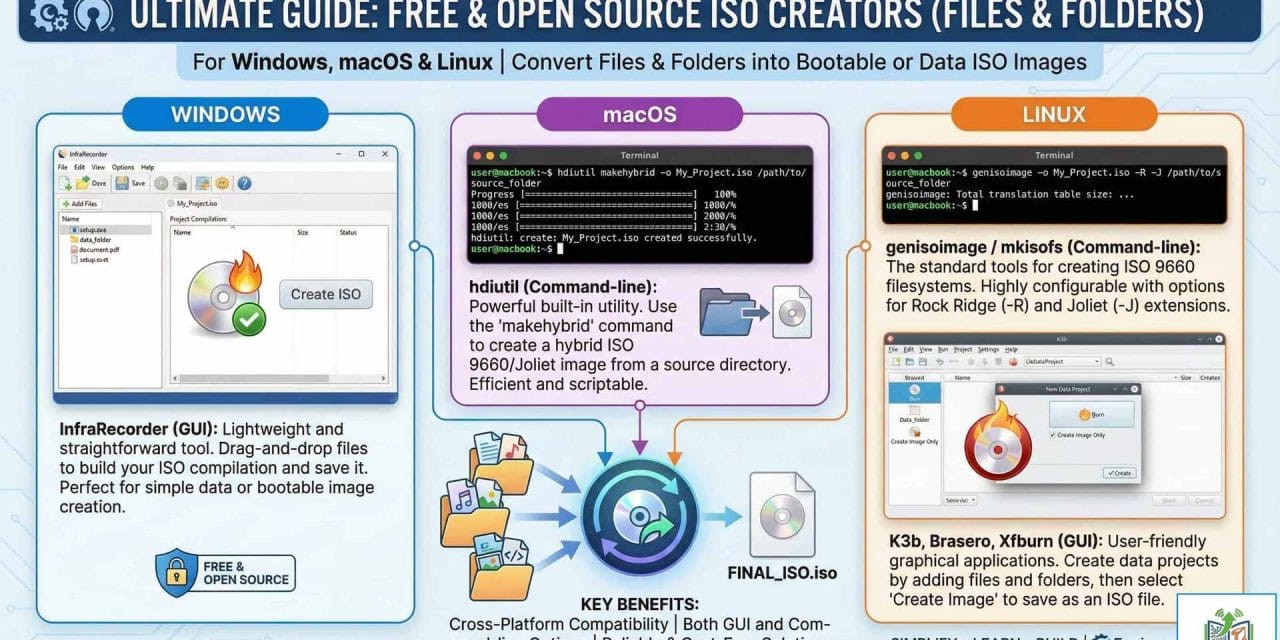
Ultimate Guide: Free & Open Source ISO Creators for Windows, macOS & Linux
By Waqas Ahmad Cheema Engineer & IT Specialist
As engineers and IT professionals, we often need to bundle data into single, immutable files. Whether it’s for archiving project drawings, creating bootable media for a Proxmox server, or simply transferring complex directory structures, the ISO format is the standard.
While modern operating systems can easily mount ISOs, finding the right tool to create them depends heavily on your platform and specific needs.
This guide covers the best free and open-source tools for Windows, macOS, and Linux, ranging from one-click shell extensions to advanced server-grade CLI tools.
🧠 Quick Pick: Best Tool by Use Case
If you are in a rush, here is the engineer’s choice for specific scenarios:
Requirement | Best Tool | Platform |
|---|---|---|
Fastest right-click ISO | WinCDEmu | Windows |
Portable (No Install) | Folder2Iso | Windows |
Bootable / Advanced | ImgBurn | Windows |
Server / Proxmox / NAS | mkisofs / xorriso | Cross-Platform |
macOS Native | hdiutil | macOS (CLI) |
Linux Desktop (GUI) | K3b | Linux |
🪟 Windows Solutions
Windows users have the widest variety of GUI tools. We have selected the ones that respect your time and system resources.
1. WinCDEmu (Open Source)
Best For: Speed and seamless Windows Explorer integration.
WinCDEmu is widely loved for its simplicity. While known for mounting discs, its “hidden” gem is the context menu entry to build ISOs instantly.
Key Feature: Right-click context menu integration.
Engineer’s Note: Perfect for quickly bundling drivers or site documentation without opening a program.
2. Folder2Iso (Freeware)
Best For: Portability and site work.
A fully portable executable (no installation required). It acts as a GUI for the powerful mkisofs command.
Key Feature: Runs from a USB stick; handles large directory trees and special characters well.
3. ImgBurn (Freeware)
Best For: Advanced mastering and bootable media.
The “heavy lifter” of the list. Essential if you need to manipulate file systems (UDF, ISO9660, Joliet) or create bootable Windows/Linux installation media.
⚠️ Warning: The official installer may contain bundled adware (“OpenCandy”). Select “Custom Installation” and uncheck extra offers.
4. Gizmo ISO Creator (Freeware)
Best For: Lightweight, no-nonsense tasks.
Part of the Gizmo Drive suite, this tool is clean, free of ads, and strictly focused on converting folders to ISOs without the burning bloatware.
5. AnyBurn (Freeware)
Best For: Simple, lightweight daily use.
Lighter than ImgBurn but more feature-rich than WinCDEmu. It supports creating bootable USB drives and editing image files.
🌍 Cross-Platform / Command Line (Servers & Automation)
For Proxmox users, NAS administrators, and those automating backups via scripts, GUI tools aren’t enough.
6. mkisofs / genisoimage (Open Source)
Best For: Automation, Servers, Proxmox.
The industry-standard command-line tool. It is the backend for many GUI apps.
Command Example:
mkisofs -o output.iso /path/to/folderAvailability: Standard in most Linux repositories (
apt install genisoimage) and available for Windows via ports.
7. xorriso (Open Source)
Best For: Hybrid ISOs (DVD + USB boot).
A modern, more powerful replacement for mkisofs. It is particularly good at creating “Hybrid” ISOs that can boot from both CD drives and USB sticks—essential for creating custom OS installers.
🍎 macOS Solutions
Mac users often don’t need third-party software at all.
8. hdiutil (Built-in)
Best For: Native, scriptable ISO creation.
macOS includes this powerful tool out of the box.
How to use (Terminal):
hdiutil makehybrid -o output.iso /path/to/source_folder -iso -joliet
9. Disk Utility (GUI)
Best For: Basic users. You can use the native “Disk Utility” to create a standard disk image (.cdr or .dmg) from a folder, and then convert it to ISO if necessary (though .cdr is often essentially an ISO on macOS).
🐧 Linux Solutions
10. K3b (Open Source)
Best For: KDE Desktop users; Feature-rich experience.
The most advanced burning and authoring tool for Linux. It is very stable and provides a full GUI for complex projects.
Install:
sudo apt install k3b
11. Brasero (Open Source)
Best For: GNOME Desktop users.
Simple, clean, and effective for basic ISO creation and burning tasks.
Install:
sudo apt install brasero
📀 Full Comparison Table
Tool Name | Platform | License | GUI/CLI | Bootable? | Best Use Case |
|---|---|---|---|---|---|
mkisofs | Win/Lin/Mac | Open Source | CLI | ✅ | Automation, Servers |
xorriso | Win/Lin/Mac | Open Source | CLI | ✅ | Hybrid Boot ISOs |
WinCDEmu | Windows | Open Source | GUI | ❌ | Fastest Right-Click |
Folder2Iso | Windows | Freeware | GUI | ❌ | Portable USB Tool |
ImgBurn | Windows | Freeware | GUI | ✅ | Advanced Mastering |
Gizmo | Windows | Freeware | GUI | ❌ | Lightweight |
AnyBurn | Windows | Freeware | GUI | ❌ | General Purpose |
InfraRecorder | Windows | Open Source | GUI | ⚠️ | Classic Interface |
hdiutil | macOS | Built-in | CLI | ✅ | Native macOS Tasks |
K3b | Linux | Open Source | GUI | ⚠️ | Linux Power Users |
🎯 Recommended Practical Setup
For a balanced toolkit that covers all bases without bloating your system, here is our recommended setup:
Windows Daily Work:
✅ WinCDEmu (Install this on your main PC for speed)
✅ Folder2Iso (Keep this on your USB stick for client sites)
Bootable / Advanced:
✅ ImgBurn (Install only when you need to make bootable media)
Linux / Proxmox / NAS:
✅ mkisofs or xorriso (Learn the basic syntax for these; they are life-savers for server management)
Conclusion
Creating an ISO file doesn’t require expensive software. For 90% of Windows users, WinCDEmu removes the friction entirely. For engineers managing servers or Proxmox environments, mastering mkisofs is a valuable skill.
Copyright @EngineerHow.com
We recommend bookmarking this guide from EngineerHow.com for future reference. Our goal is to make complex technical topics simple and accessible for everyone.
🔗 Useful Links 📺 EngineerHow YouTube Channel: www.youtube.com/@EngineerHow
📢 About EngineerHow.com EngineerHow.com is dedicated to providing expert IT and engineering tutorials, helping professionals and enthusiasts set up servers, networks, and self-hosted solutions. Our guides focus on step-by-step instructions to make complex topics easy to understand.
🚀 Explore More IT Guides: EngineerHow.com
💬 Join the Discussion! Have questions or insights? Drop a comment below and let’s discuss!
Copyright © 2025 EngineerHow.com. All Rights Reserved.