Overview
For engineers, IT professionals, and technical instructors, high-quality video content is essential for creating tutorials, documenting projects, or presenting simulations. However, professional video editing software like Adobe Premiere Pro often comes with a steep monthly subscription cost. Fortunately, 2026 offers a robust selection of free and open-source video editors that serve as powerful alternatives.
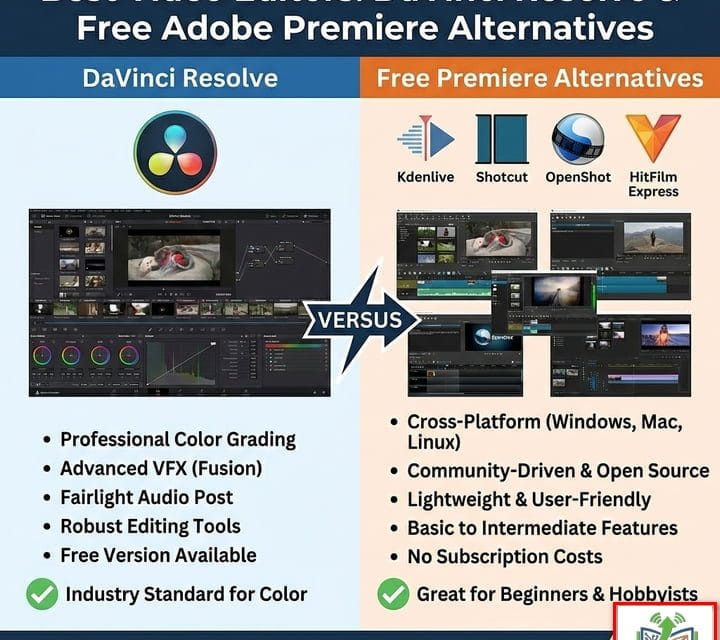
In this guide, we explore DaVinci Resolve (the top industry competitor to Premiere) and the best open-source alternatives like Kdenlive and Shotcut. Whether you are editing a simple site report or a complex 4K training module, these tools provide the power you need without the price tag.
Post Contents
1. DaVinci Resolve (Free Version)
The Best Free Alternative to Adobe Premiere
While not open-source, the free version of DaVinci Resolve is widely considered the most powerful video editor available at no cost and the closest direct competitor to Adobe Premiere Pro. It is the same software used by Hollywood studios for color grading and editing.
Best For: Professional-grade editing, color correction, and audio post-production replacing the entire Adobe Suite.
Key Features (2026 Update):
Unrestricted 4K Export: Edit and export in Ultra HD (3840×2160) at up to 60fps.
AI Tools: Includes select AI features from the Studio version, such as basic voice isolation and smart reframe.
Fairlight Audio: A built-in Digital Audio Workstation (DAW) for professional audio mixing.
Fusion VFX: Node-based visual effects for creating titles and motion graphics (Alternative to Adobe After Effects).
Limitation: Requires a powerful GPU and substantial RAM (16GB minimum recommended). It is proprietary software, not FOSS.
Download Direct Official DaVinci Resolve
Official Website Download Link
2. Kdenlive
The Open-Source “Premiere Pro”
Kdenlive (KDE Non-Linear Video Editor) is the top choice for Linux and Windows users who want a truly open-source (GPLv2+) professional editor. It offers a classic multi-track timeline workflow that will feel very familiar to former Adobe Premiere users.
Best For: Intermediate to advanced users who want a customizable, free, and open-source workflow.
Key Features (v25.12+):
Multi-Track Editing: Unlimited video and audio tracks.
Proxy Editing: Automatically creates low-res copies of your clips for smooth editing on weaker hardware (e.g., standard office laptops).
Customizable Interface: Dock and undock panels to suit your dual-monitor setup.
Wide Format Support: Handles almost any file type via FFmpeg.
Platform: Windows, Linux, macOS.
3. Shotcut
Reliable & Format Agnostic
Shotcut is another excellent open-source editor that has seen significant performance improvements in 2026. It supports “native timeline editing,” meaning you do not need to import clips into a project bin before adding them to your timeline.
Best For: Users who need to edit mixed formats quickly without transcoding.
Key Features (v26.1):
Native Editing: Drag and drop files directly onto the timeline.
Hardware Acceleration: Improved GPU acceleration for exporting and previewing in the latest versions.
Portable Version: Can be run from a USB drive without installation—ideal for IT admins working on restricted machines.
4K Support: Fully supports 4K resolutions and latest codecs (AV1, HEVC).
Platform: Windows, Linux, macOS.
4. OpenShot
Best for Beginners
If DaVinci Resolve or Kdenlive feels too complex, OpenShot is the perfect starting point. It is designed to be as simple as possible while still offering powerful features under the hood.
Best For: Beginners, quick edits, and simple slide-show style videos.
Key Features:
Simple Interface: Drag-and-drop workflow that is easy to learn in minutes.
Animation Framework: Powerful keyframe animation for moving text and images.
Blender Integration: Can integrate with Blender to render 3D animated titles.
Platform: Windows, Linux, macOS, Chrome OS.
5. Blender
The 3D & Video Hybrid
While primarily known as a 3D creation suite, Blender includes a fully functional Video Sequence Editor (VSE).
Best For: Users who already use Blender for 3D modeling or require complex 3D overlays in their video.
Key Features (v5.0):
32 Slots: plenty of tracks for video, images, audio, and effects.
Live Preview: Real-time preview of edits.
Compositing: Industry-leading compositing nodes for combining video with 3D elements.
Comparison Summary
Feature | DaVinci Resolve (Free) | Kdenlive | Shotcut | OpenShot |
|---|---|---|---|---|
License | Proprietary (Free) | Open Source (GPL) | Open Source (GPL) | Open Source (GPL) |
Premiere Alternative? | Direct Competitor | Closest UI Match | Good | Basic |
4K Export | Yes | Yes | Yes | Yes |
System Req. | High (GPU Heavy) | Medium | Low/Medium | Low |
Best Use | Color Grading / Pro Work | General Purpose / Linux | Quick Edits / portable | Beginners |
Conclusion
For most engineering and professional documentation needs, DaVinci Resolve is the superior choice if you have the hardware to run it. Its color science and audio tools are unmatched, making it the definitive free alternative to Adobe Premiere Pro. However, if you prefer open-source software or are running on lighter hardware (like a standard field laptop or NAS-hosted VM), Kdenlive is the most robust and feature-rich alternative in 2026.
Choose the tool that fits your hardware and your commitment to the open-source philosophy.
Copyright
@EngineerHow.com
We recommend bookmarking this guide from EngineerHow.com for future reference. Our goal is to make complex technical topics simple and accessible for everyone.
🔗 Useful Links 📺 EngineerHow YouTube Channel (www.youtube.com/@EngineerHow)
📢 About EngineerHow.com EngineerHow.com is dedicated to providing expert IT and engineering tutorials, helping professionals and enthusiasts set up servers, networks, and self-hosted solutions. Our guides focus on step-by-step instructions to make complex topics easy to understand.
🚀 Explore More IT Guides: EngineerHow.com
💬 Join the Discussion! Have questions or insights? Drop a comment below and let’s discuss!
Copyright © 2026 EngineerHow.com. All Rights Reserved.