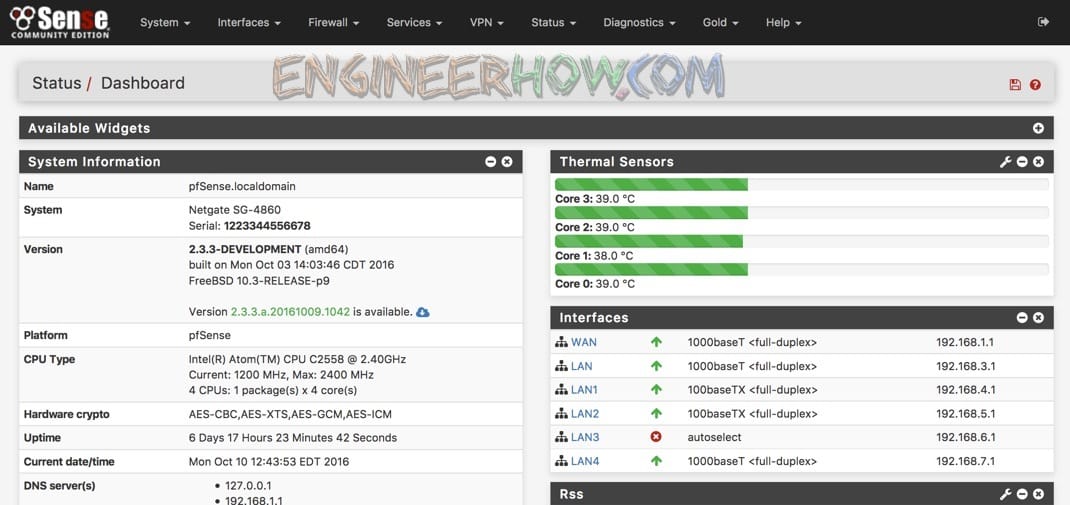
🔥 What is pfSense?
pfSense is an open-source firewall and router software based on FreeBSD. It is widely used for securing networks, VPNs, traffic shaping, and more. It offers enterprise-grade security while remaining free for personal and business use.
✅ Key Features of pfSense
- Firewall & Security – Stateful packet filtering, intrusion detection (Snort/Suricata)
- VPN Support – OpenVPN, IPSec, WireGuard for secure remote access
- Traffic Shaping – Prioritize bandwidth usage for better performance
- Captive Portal – Ideal for guest networks with authentication
- High Availability – Redundancy with CARP for failover setups
- Load Balancing – Distribute traffic efficiently
- DNS & DHCP Server – Built-in services for easy network management
- Custom Packages – Expand functionality with plugins like pfBlockerNG
🏠 Self-Hosting pfSense: How to Set It Up
🔹 Requirements
- A dedicated server, old PC, or a supported firewall appliance
- Minimum 1 GHz CPU, 1 GB RAM, and 4 GB storage
- Two or more network interfaces (WAN & LAN)
🔹 Installation Steps
- Download pfSense ISO – Official Download Link
- Create a Bootable USB – Use Rufus or balenaEtcher
- Boot & Install – Follow the guided installation
- Initial Configuration – Set up LAN/WAN interfaces
- Access Web GUI – Default IP:
https://192.168.1.1(login: admin/pfsense) - Configure Firewall Rules – Secure inbound and outbound traffic
- Enable VPN & Services – Customize features as needed
🔄 pfSense vs. Alternatives (Comparison Table)
| Feature | pfSense | OPNsense | OpenWRT | VyOS | IPFire |
|---|---|---|---|---|---|
| Open-Source | ✅ | ✅ | ✅ | ✅ | ✅ |
| VPN Support | ✅ OpenVPN, WireGuard | ✅ OpenVPN, WireGuard | ✅ Basic | ✅ Advanced | ✅ Basic |
| GUI Interface | ✅ User-Friendly | ✅ Modern UI | ⚠️ CLI-heavy | ⚠️ CLI-heavy | ✅ Simple UI |
| Firewall Security | ✅ Advanced | ✅ Advanced | ⚠️ Basic | ✅ Enterprise-grade | ✅ Basic |
| Best For | Business, Home, Advanced Users | Business, Home | DIY Routers | Enterprises, ISPs | Home & Small Offices |
📌 Verdict:
- pfSense – Best overall for advanced users & businesses
- OPNsense – A great alternative with modern UI
- OpenWRT – Ideal for custom router firmware
- VyOS – Enterprise-grade CLI-based firewall
- IPFire – Lightweight firewall for home users
🚀 Free & Top-Rated Alternatives
- OPNsense – A fork of pfSense with a modern interface
- MikroTik RouterOS – Advanced routing & firewall features
- Untangle NG Firewall – GUI-based firewall with web filtering
- IPFire – Simple but effective firewall solution
- OpenWRT – Best for custom router firmware
📥 Download & Install pfSense
👉 Download pfSense (Free & Open-Source)
📌 Hardware Support:
- Netgate appliances (officially supported)
- Compatible with Intel/AMD-based PCs
- Virtualization: Runs on Proxmox, VMware, VirtualBox, Hyper-V
🎥 Watch the Video Tutorial
📺 Ultimate pfSense Setup Guide
📝 Conclusion
pfSense is one of the best open-source firewalls, offering high-end security, VPN support, and customizability. It’s a great choice for home users, businesses, and IT professionals. Whether self-hosting or using Netgate hardware, it provides a solid security foundation.
💬 Have you used pfSense? Share your experience in the comments!
ℹ️ About EngineerHow.com
🚀 EngineerHow is your go-to platform for IT, networking, and self-hosting tutorials. We provide step-by-step guides on open-source solutions, VPS hosting, Docker, and more.
🔔 Stay Updated! Subscribe for more self-hosting and IT security tutorials!