

Creating ISO images from folders is a handy way to back up data, create bootable ISOs, or package content. In this guide, we’ll show you how to add a “Create ISO from Folder” option to the right-click context menu in Windows using free Microsoft tools and a custom PowerShell script.
✅ Why You Might Need This
- Package a project or software folder into an ISO
- Easily create bootable ISOs for virtual machines
- Backup directories in a universal format
🔧 What You Need
- Windows OS (10/11)
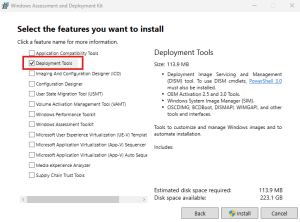
- Windows ADK (Deployment Tools)
- PowerShell (built-in)
Install Windows ADK:
- Download from Microsoft ADK Page
- Note installation path

- Choose Deployment Tools during installation
- Locate
oscdimg.exe, usually found at:
C:\Program Files (x86)\Windows Kits\10\Assessment and Deployment Kit\Deployment Tools\x86\Oscdimg\oscdimg.exe
📁 Download the Script
Download the ready-to-run PowerShell script bundle:
📂 Download iso_context_menu.zip
Contents:
Add-CreateISO-ContextMenu.ps1Remove-CreateISO-ContextMenu.ps1
▶️ How to Add “Create ISO” to Context Menu
1. Extract and open Add-CreateISO-ContextMenu.ps1 in PowerShell
Right-click the file and select Run with PowerShell (as Administrator).
2. Right-Click a Folder
You’ll now see “Create ISO from this folder 💿” in the menu.
3. The script will:
- Use
oscdimg.exe - Generate an ISO in the same directory
- Name the ISO based on the folder (e.g.,
MyFolder.iso)
❌ How to Remove It
If you want to remove the context menu item:
- Run
Remove-CreateISO-ContextMenu.ps1with PowerShell (as Admin).
🔍 Alternatives for Creating ISOs
| Tool | Type | Open Source | Context Menu Support | Notes |
|---|---|---|---|---|
| AnyBurn | Freeware | No | ✅ Yes | Lightweight, clean UI |
| InfraRecorder | Open Source | ✅ Yes | ✅ Yes (manual setup) | Classic tool, still works |
| CDBurnerXP | Freeware | No | ✅ Yes | Reliable, feature-rich |
| K3b (Linux) | Open Source | ✅ Yes | ✅ Yes | KDE users |
| Nautilus Script | Open Source | ✅ Yes | ✅ Yes | Works on Ubuntu GNOME |
🚀 Free & Open Source Alternatives
- InfraRecorder – infrarecorder.org
- K3b (Linux) – k3b.org
- Nautilus ISO Script (Linux) – GNOME scripts
- Bonus Gizmo Centaral Offcial Link or Direct Download Link
📚 About EngineerHow.com
At EngineerHow.com, we simplify complex tech—covering self-hosted apps, networking, servers, civil engineering, and open-source tools. Whether you’re setting up a VPS, Docker stack, or automating backups, we’ve got you.
Explore more on EngineerHow.com and our YouTube channel: 🎥 youtube.com/@engineerhow
🖊️ What Do You Think?
Did this guide help? Got questions or improvements? Drop a comment below or reach out!


