

🔎 What is OPNsense?
OPNsense is a powerful, open-source firewall and routing platform based on HardenedBSD. It’s trusted by IT professionals, home lab enthusiasts, and businesses to protect their networks — all for free.
With an intuitive web UI, plugin system, and features like VPN, IDS/IPS, and traffic shaping, OPNsense transforms any PC, mini-PC, or VPS into a secure and flexible gateway.
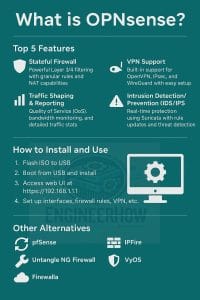
🎯 Why Choose OPNsense? (Top Features)
| Feature | Description |
|---|---|
| 🔥 Next-Gen Firewall | Stateful, rule-based packet filtering with NAT |
| 🔐 Built-in VPN | OpenVPN, IPSec, WireGuard support for remote access |
| 🚨 IDS/IPS with Suricata | Real-time intrusion detection and prevention |
| 📈 Traffic Shaping | Prioritize gaming, VoIP, or streaming |
| 🧩 Plugin Support | Add reverse proxy, SSL, dark themes, and more! |
💻 How to Install OPNsense (VPS or Bare Metal)
✅ Requirements:
- 2+ NICs (physical or virtual)
- 2GB RAM minimum
- 10GB+ storage
- Compatible VPS (KVM preferred) or bare metal device
🛠️ Installation Steps:
- Download ISO: https://opnsense.org/download/
- Flash with Rufus (USB) or mount on VPS as ISO
- Install using guided installer
- Login to Web UI:
https://192.168.1.1- Username:
root - Password:
opnsense
- Username:
- Change password, assign WAN/LAN, and update
🔄 Update System
Go to System > Firmware > Updates and apply available updates.
🔐 Configure Firewall Rules
- Navigate to
Firewall > Rules > LAN - Add rules to allow/deny specific traffic
🔐 VPN Setup (OpenVPN / WireGuard)
- Go to
VPN > OpenVPN > Wizardsto create secure tunnels - Use
os-wireguardplugin for a faster, simpler VPN setup - Export config to connect phones, laptops, or remote workers
📌 Want to self-host with WireGuard? Check out our WireGuard on VPS guide
🚨 Enable IDS/IPS (Suricata)
- Navigate to
Services > Intrusion Detection - Enable IDS and select rules (ET Open recommended)
- Turn on IPS mode for active protection
- Monitor attacks in the dashboard
📦 Best Plugins for Extra Power
| Plugin | Use |
|---|---|
os-wireguard | WireGuard VPN support |
os-nginx | Built-in Nginx reverse proxy |
os-acme-client | Let’s Encrypt SSL automation |
os-theme-rebellion | Dark theme UI |
os-zabbix-agent | Remote monitoring |
🧾 [Download] OPNsense Cheat Sheet
👉 Download PDF Cheat Sheet (coming soon)
Covers CLI commands, UI locations, VPN configs, and plugin setup — perfect for sysadmins.
✅ Part 1: OPNsense Cheat Sheet (Markdown Format)
You can include this in your blog post, or link to a downloadable PDF. Let me know if you’d like a designed PDF version too!
🧾 OPNsense Cheat Sheet (Quick Commands & Tips)
🔹 Default Access
- Web GUI:
https://192.168.1.1 - Username:
root - Password:
opnsense
🔧 System Maintenance
| Task | Command / UI Path |
|---|---|
| Update system | System > Firmware > Updates |
| Reboot firewall | System > Reboot or reboot via SSH |
| Backup config | System > Configuration > Backups |
| Restore config | System > Configuration > Restore |
🌐 Interface Setup
| Task | UI Path |
|---|---|
| Assign WAN/LAN | Interfaces > Assignments |
| Static IP | Interfaces > [WAN/LAN] > Static IP |
| Enable DHCP | Services > DHCPv4 |
| View IPs | Dashboard or ifconfig via shell |
🔥 Firewall Rules
| Task | UI Path |
|---|---|
| Create LAN rules | Firewall > Rules > LAN |
| NAT port forwarding | Firewall > NAT > Port Forward |
| Block outbound traffic | Firewall > Rules > WAN |
🔐 VPN Setup
| VPN Type | Setup Path |
|---|---|
| OpenVPN | VPN > OpenVPN > Wizards |
| IPSec | VPN > IPSec > Tunnels |
| WireGuard | VPN > WireGuard (install plugin first) |
🛡️ IDS/IPS Setup
| Task | UI Path |
|---|---|
| Enable IDS | Services > Intrusion Detection |
| Choose rules | ET Pro/ET Open |
| Enable IPS mode | Tick “IPS Mode” in IDS settings |
🧩 Plugin Management
| Task | UI Path |
|---|---|
| Install Plugin | System > Firmware > Plugins |
| Examples | os-wireguard, os-nginx, os-acme-client |
🖥️ Useful CLI Commands (SSH / Console)
ifconfig # View IP addressestop # Monitor system usagepfctl -sr # View current firewall rulespfctl -d # Disable firewall (for emergency testing)pfctl -e # Enable firewall
🔁 Best Free Alternatives to OPNsense
| Tool | Notes | Open Source |
|---|---|---|
| pfSense CE | Powerful but slower UI, fewer plugins | ✅ |
| IPFire | Lightweight firewall distro | ✅ |
| VyOS | CLI-driven, used for routers | ✅ |
| Untangle NG | Clean UI, limited free version | ⚠️ |
| Sophos XG Home | Powerful, proprietary | ❌ |
📺 Watch on YouTube
🎥 OPNsense Install & Setup – Full Tutorial
Learn how to deploy it on your VPS, configure VPNs, and secure your home or business network.
📘 About EngineerHow.com
EngineerHow.com helps engineers, IT pros, and enthusiasts take control of their digital world. From open-source firewalls to Docker, self-hosted apps, and NAS setups, we provide real-world guides with step-by-step clarity.
💬 Got questions or want help securing your VPS or router with OPNsense?
Drop a comment or reach out — we’re here to help!


