
📖 Post Content:
When planning lifts using cranes, understanding how the number of falls (rope lines) affects the Safe Working Load (SWL) is crucial. This post explains how to calculate the new SWL when the number of falls is changed — using real examples, a downloadable Excel calculator, and a clear diagram. 👇
🧠 Understanding SWL and Falls
✅ SWL (Safe Working Load)
The maximum load that lifting equipment (like a crane or hoist) can safely handle under ideal conditions.
✅ Falls of Rope
The number of supporting lines (falls) in a pulley block system. The more falls you have:
🧷 The more mechanical advantage you gain
🧯 The more weight can be lifted safely
🐢 The slower the lifting process becomes
🔧 Problem:
You’re using a crane that has a Safe Working Load (SWL) of 40 tons with an 8-fall block.
Now you’re considering using only 6 falls on the same crane block. So the question is:
❓ What would the new SWL be if the number of falls is reduced from 8 to 6?
📌 Scenario:
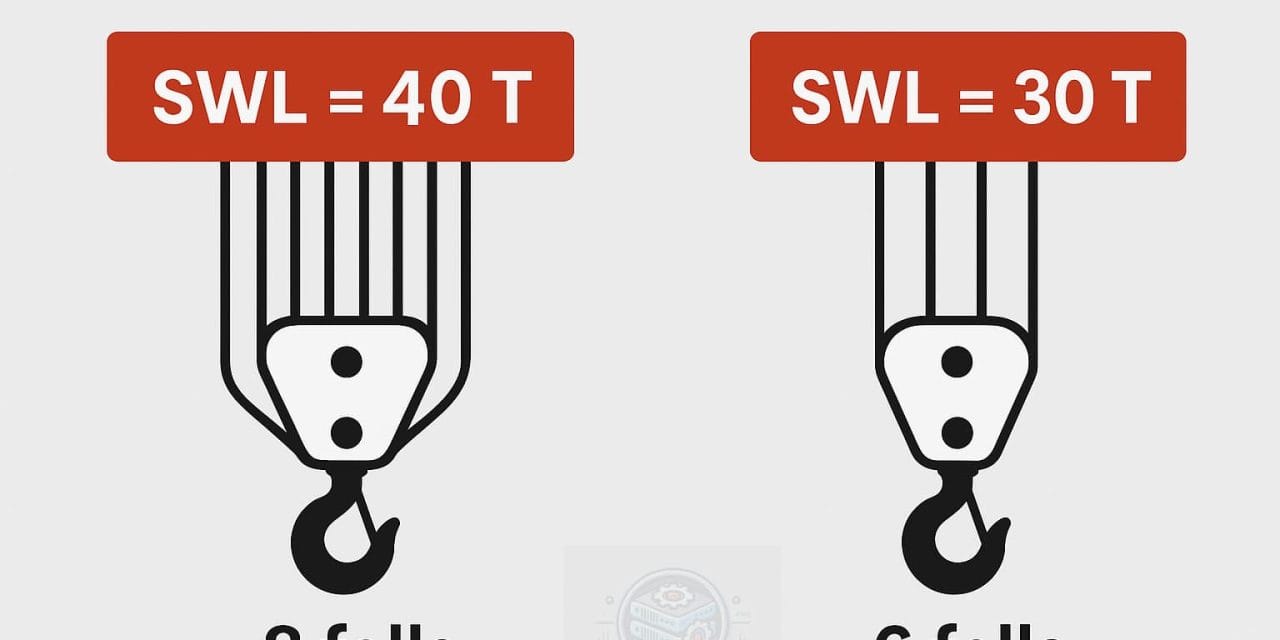
🔸 Original SWL: 40 Tons (with 8 falls)
🔸 New configuration: 6 falls
🧮 Step-by-Step Calculation
Given:
- Original SWL = 40 Tons (with 8 falls)
- New falls = 6
✅ Step-by-Step Calculation:
In ideal conditions (no friction, perfect reeving, etc.), SWL is directly proportional to the number of falls, since more falls mean more ropes are sharing the load.
So, we can set up a proportion:
✅ Final Answer:
30 Tons
📊 Quick Comparison Table
| Number of Falls | SWL (Tons) | % of Original SWL |
|---|---|---|
| 8 | 40 | 100% |
| 6 | 30 | 75% |
| 4 | 20 | 50% |
| 2 | 10 | 25% |
⚠️ Always verify SWL changes with the crane manufacturer or a competent person before altering lifting configurations in real-world operations.
🧠 Pro Tips & Examples
- More falls = Higher load capacity, but slower lift speed
- Fewer falls = Faster lifting, but reduced capacity
- Ideal Conditions assume no friction, perfect load balance, and no dynamic movement.
- In real-world applications, factors like reeving efficiency, sheave friction, and dynamic load forces must be considered.
🛠 Example:
On a site using a 50-ton crawler crane with an 8-part line:
- A supervisor decides to speed up lifting by changing to a 6-part line without checking SWL.
- A 40-ton concrete beam is lifted and the line parts because the reduced configuration only supports 37.5 tons max under realistic conditions.
💥 Lesson: Never reduce falls without recalculating SWL and applying safety factors!
📊 Visual Diagram
Below is a simple visualization of how rope falls affect lifting capacity:
You can download this image here:
📥 Download Crane Load Calculator (Excel)
🎁 This easy-to-use Excel file lets you:
- Input original SWL
- Enter original & new number of falls
- Automatically get the new SWL
- Visual warnings for unsafe limits
👉 Download Excel Tool (Crane Load Calculator)
Crane Load Fall SWL Calculations.xlsx
📚 Free Lifting Tools & Software
| Tool | Type | Link |
|---|---|---|
| Crane Load Calculator | Excel | Download |
| Crane Planner 2.0 | 3D CAD Tool | Liebherr Site |
| LibreCAD | 2D CAD (Open Source) | librecad.org |
| FreeCAD | 3D CAD (Open Source) | freecad.org |
🏗️ Crane CAD Tools (Free Options)
✅ 1. CADS RC3D for Crane Layouts (Free Trial / Student License)
An advanced CAD tool used in construction for lifting plans, 3D crane layouts, and rigging simulations.
🔗 https://cads.co.uk/products/cads-rc3d/
✅ 2. Crane Planner 2.0 by Liebherr (Free Tool)
Professional-grade 3D crane planning software for Liebherr cranes, but also useful for general lift simulation and diagrams.
🔗 https://www.liebherr.com/en/int/products/cranes/crane-planner-20/crane-planner-20.html
✅ 3. AutoCAD with Lifting Plugins
If you’re using AutoCAD, plugins like:
- LiftPlanner
- Crane Plugin for Revit
Can be found at: 🔗 https://liftplanner.com/
✅ 2. Open-Source Lifting Gear Analysis Tools (Linux/Windows)
Here are actual open-source or free software/tools for lifting calculations or rigging layouts on both Linux and Windows
🛠️ 1. LIFTPLAN LITE
- 💻 Platform: Windows
- 🆓 Free version of the full LiftPlanner
- Great for basic lift diagrams and planning
- Supports custom crane specs and load charts
🔗 https://www.liftplanner.com/
🛠️ 2. LibreCAD + Crane Blocks Library
- 💻 Platform: Windows / Linux
- 100% Open-source 2D CAD tool
- Add your own crane blocks, rigging diagrams, and load chart shapes
🔗 https://librecad.org/
🛠️ 3. OpenSCAD
- 💻 Platform: Windows / Linux / macOS
- Open-source 3D parametric modeling
- Can be scripted to model crane configurations and pulley systems
🔗 https://openscad.org/
🛠️ 4. FreeCAD with Assembly Add-on
- 💻 Platform: Cross-platform
- Use FreeCAD with the Assembly add-on to simulate crane arm positions and rigging loads
- Add constraint-based motion to simulate lift
🔗 https://www.freecad.org/
🛠️ 5. JCrane by Oregon State University (Older but academic tool)
- Academic Java-based crane simulation software
- Includes rigging configurations and lift path analysis
🔗 Archived info
📦 Summary Table
| Tool | Type | Platform | Link |
|---|---|---|---|
| Crane Load Calculator | Excel | Windows/macOS/Linux | Download |
| LiftPlan Lite | Lift Planning | Windows | liftplanner.com |
| LibreCAD | 2D CAD | Windows/Linux | librecad.org |
| OpenSCAD | 3D Modeling | Cross-platform | openscad.org |
| FreeCAD | Parametric CAD | Cross-platform | freecad.org |
🎓 Learning Templates & Cheat Sheets
- 🧠 AutoCAD Commands Cheat Sheet (PDF) – Coming soon
- 🧮 Unit Conversion Table for Civil Engineers – Coming soon
- 📘 VPS Setup Checklist (Linux) – Coming soon
📺 Watch on YouTube
▶️ Coming soon: A video guide walking through the Excel calculator and theory.
Subscribe here: EngineerHow YouTube Channel
ℹ️ About EngineerHow.com
EngineerHow.com is your go-to platform for simplified engineering and IT tutorials, tools, and self-hosted solutions. We offer step-by-step guides for professionals and students alike — across civil engineering, server setup, open-source tools, and beyond.
💬 Got Questions?
Leave a comment below or contact us.
Your feedback helps us improve and release more tools like this!


